|
How
To Change The Color of Any Windows Folder - No More Boring Yellow
Folders
--Click here to return to main Help Page--
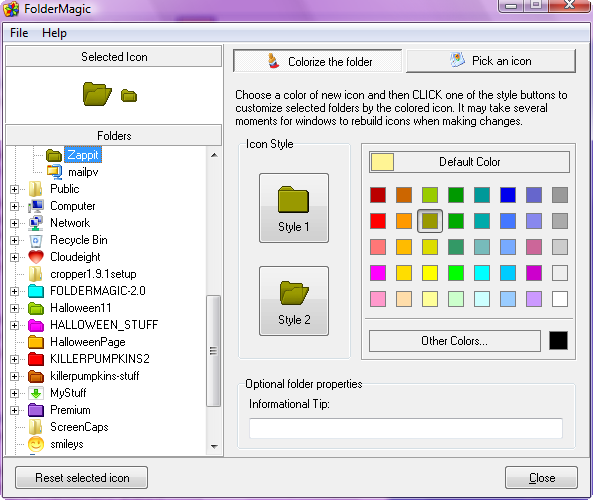
1. Right-click only works on XP, Vista. You will need to open
FolderMagic to make changes on all versions. Click on the image (at left) so see
a larger image of the Folder color customization dialog.
Note: Open Folder Magic; you cannot right click to change a folder.
2. Choose between the two styles of folders offered by
FolderMagic (Style 1 or 2)
3. Choose any of the premixed colors
showing in the color dialog or mix your own by clicking "More
colors"
4. After you've selected the folder color you want, simply
double-click on the folder style you prefer. You cannot change
folder colors in Windows 10 but you can change icons.


Click here for details.
We will connect directly to your Computer via the
Internet to fix your computer problems or optimize your PC!
You never have to leave your home or leave your computer
with a stranger. You can watch while we fix your Windows
computer. Our Cloudeight Direct Service is available
Worldwide.
Click here for details.
Home |
About |
Help |
FAQ | Download
| Icon
Packs |
Contact Us
Cloudeight Direct Remote Computer Care
FolderMagic works with in all versions of Windows XP, Windows
Vista and Windows 7 and 8 and 10.
. All content is copyright ©2006-2018 Cloudeight
Internet LLC. FolderMagic™ is a trademark of Cloudeight Internet
LLC.
|